
-

Learn any subject quickly with electronic flashcards! Download from online databases on ANY subject FREE! Flashbook Flashcards lets you decide what you want to ...
闪光的书抽认卡精(简版)

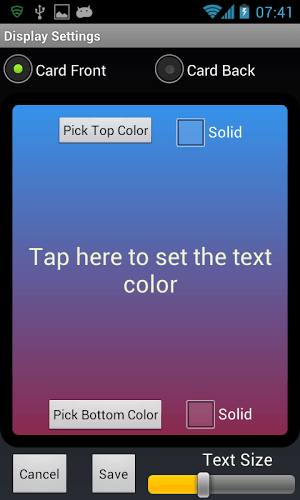
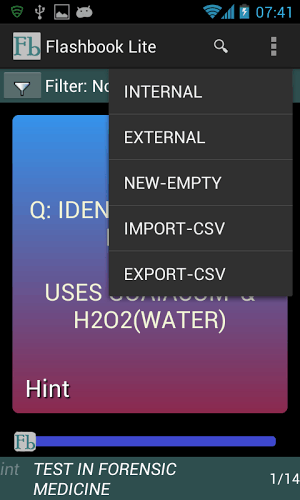
Learn any subject quickly with electronic flashcards! Download from online databases on ANY subject FREE! Flashbook Flashcards lets you decide what you want to study and allows you to save thousands of decks on your mobile device! You can download the millions of flashcards at Cram.com and Quizlet.com FREE! We login for you, automatically assemble and present your decks ready for use. Flashbook Flashcards is a powerful, fun-to-use and fully customizable flashcard viewer. Once your flashcard decks are downloaded, no internet connection is needed for use. You can browse through your flashcard decks using various study and memorization techniques, such as spaced repetition, which enhances memory retention. It is the perfect memorization/study tool for people on-the-go because it's always with you, ready to use and remembers where you left off. This Flashbook Flashcard "Lite" version provides all the functionality and features of the full paid version but only offers 3 flashcard decks at a time on your chosen subject (the full version offers 20 flashcard decks to select from on any topic). Like the full version, there are no limits to the amount of flashcard decks you can store and use or to the size of your decks. Automatically downloading flashcard decks directly from Cram.com or Quizlet.com is just one way to obtain decks, they can also be imported via CSV files or created using Flashbook itself. Flashcard decks can be stored and run on internal memory or from your external SD card. Using your SD card allows easy mass editing of decks using a PC and allows flashcard decks to be shared with others. Decks can be filtered to show only cards that contain specific words or phrases. You can also shuffle decks and switch the questions with the answers. The colors of the card fronts, backs and text can be set, as can the font size. Cards can be reviewed sequentially or used with spaced repetition. A modified Leitner method is offered which reinforces your memory retention by showing you the cards you are having trouble with more often. You can set the number of times you must get a card correct before it is temporarily hidden. To locate a flashcard deck on a specific subject, tap the magnifying glass icon (or tap SEARCH FOR DECKS) at the top of the main screen. With an active internet connection, the most relevant decks related to your search term will be shown. Tap on a listed deck and you can immediately load it and begin swiping through it. Tap a card in the deck to flip it over and see the answer. If you answer the question correctly, tap on "Get It Right?" to hide the card and move on to the next card, or just swipe the card away to bring up the next card. Flashbook's main screen always displays a card from the current deck - you are always working. Tap the main menu icon and you have access to Flashbook's features. Below the top title bar of the main screen is the Filter bar, where you can specify a phrase that all currently visible cards must contain. At the very bottom left of the screen is the text "int" or "ext" that specifies whether your current deck is running from internal or external memory. Next to that is the current deck's name and further right is the current card number out of total cards visible (not hidden or filtered out). All hidden and filtered cards are re-shown when the current deck is reset from the main menu. Just above the bottom line is a slider that allows you to jump to any position in a deck. Long press on any card and you can edit that card, add another card or delete that card permanently. Each card can contain a Question, Answer, Hint and Subject. Use electronic flashcards - save a tree! 快速学习任何学科与电子卡片!下载就任何主题的免费在线数据库! Flashbook抽认卡可以让你决定你想学习什么,可以让你节省数千甲板的移动设备上!您可以下载数以百万计的卡片在Cram.com和Quizlet.com免费!登录后,我们为你自动组装和展示您的甲板上准备就绪。 Flashbook抽认卡是一个强大的,富有趣味性的使用,完全可定制的烧录卡阅读器。一旦你的烧录卡甲板被下载,就需要使用没有互联网连接。您可以通过使用各种学习和记忆技术,如重复间隔,从而提高记忆保持你的烧录卡甲板浏览。这是一个完美的记忆/学习工具的人在这去,因为它总是和你在一起,准备使用,并记住您离开的地方。 这Flashbook抽认卡“精简版”的版本提供了所有的功能和完整付费版的功能,但只提供了3烧录卡在甲板上每次你选择的科目(完整版提供了20烧录卡从甲板上的任何话题来选择)。像完整版的,没有限制的烧录卡录像机可以存储和使用量或您甲板的大小。自动直接从Cram.com下载烧录卡的甲板或Quizlet.com只是一种方式来获得甲板,他们也可以通过CSV文件导入或使用Flashbook自己创造。 烧录卡的甲板可以存储和运行在内部存储器或从您的外置SD卡。使用SD卡可以使用PC甲板易于大规模的编辑,并允许烧录卡甲板与他人共享。甲板可以进行过滤,仅显示包含特定单词或短语卡片。您也可以洗牌甲板和切换与答案的问题。该卡方面,背部和文字的颜色可以设置,如可以的字体大小。 卡可以依次审查或间隔重复使用。一种改进的莱特纳方法是提供其通过向您展示您遇到麻烦更经常的卡片强化你的记忆力。您可以设置的时候,你必须得到一个正确的卡之前,暂时隐藏号码。 要找到一个烧录卡甲板上的一个特定的主题,请点选主画面上方的放大镜图标(或用于甲板点击搜索)。随着活动的Internet连接,将显示相关的搜索词最相关的甲板进行。点选上市甲板上,并可以立即加载它,并开始通过它刷卡。点选卡在甲板翻转过来,一看便知。如果你正确地回答这个问题,点击“得到它的权利?”隐藏卡,并移动到下一张卡片,或者只是刷卡走,调出下一张牌。 Flashbook的主屏幕总是从目前的甲板显示卡 - 你一直在努力。点击主菜单图标,您可以访问Flashbook的功能。下面的主屏幕顶部的标题栏的过滤器吧,在那里你可以指定所有当前可见的牌必须包含一个短语。在屏幕的底部左侧是“内部”或“转”,指定是否您目前的甲板从内部或外部存储器中运行。旁边是当前甲板的名称和进一步右边是当前卡号出可见的总卡(未隐藏或过滤掉了)的。所有隐藏并过滤卡被重新显示时,当前卡片组从主菜单复位。 正上方的底线是一款滑盖,使您可以跳转到任何位置的甲板。长按任意卡,您可以编辑卡,加上另一张卡或永久删除卡。每张卡可以包含一个问题,答案,提示和主题。 用电子卡片 - 保存一棵树!
闪光的书抽认卡精(简版)游戏截图


本周飙升榜


















新游期待榜
热门推荐


相关专题
最新专题
- 王国之锋下载地址
- 好玩的推箱子游戏大全
- 万灵之契下载链接
- 好玩的像素slg游戏分享
- 好玩的魔兽rpg手游分享
- 好玩的兽人控游戏下载
- 流行的山海经手游怎么下载
- 受欢迎的老游戏有哪几个
- 好玩的神雕侠侣游戏分享
- 受欢迎的网易游戏有哪些
- 耐玩的ufc游戏手机版分享
- 耐玩的三国单机游戏推荐
- 流行的放置三国手游分享
- 好玩的安卓策略游戏下载
- 受欢迎的奥特曼游戏有哪些
- 钓鱼游戏钓鱼游戏有哪几个
- 2026最火的传奇手游有什么
- 耐玩的双人同屏合作游戏
- 人气较高的3d摩托车游戏大全
- 2个人可以玩什么游戏2026
- 2026过家家游戏下载推荐
- 2026可以杀人的游戏有什么
- ff14加速器怎么选
- 加速器安卓下载推荐
- 彩虹六号加速器推荐哪款
- 代号鸢掉线掉帧如何改善
- 火爆的单机nba篮球游戏排行榜
- 受欢迎的偶像养成游戏大全
- 羔羊游戏完整版下载推荐
- 开罗系列游戏大全



- 友情链接
- 最新游戏


 粤公网安备44010602000283号

玩家评论
更多>>全部评论