
-
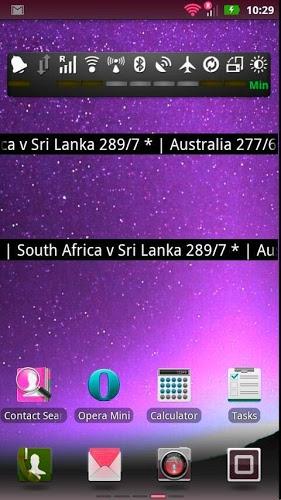
The best Live Cricket Score Widget Ticker in the Android market! No need to run a new App just to catch the score. With this widget, the current live cricket sc...
Live Cricket Score Widget

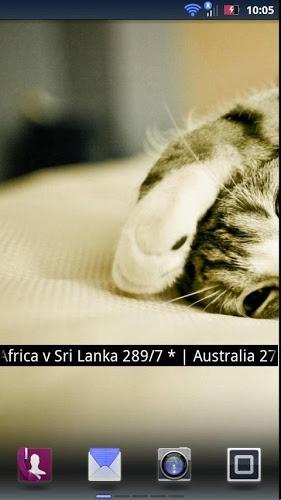
The best Live Cricket Score Widget Ticker in the Android market! No need to run a new App just to catch the score. With this widget, the current live cricket scores are right there on your homescreen. Very light weight (~100kb!) and does NOT drain your battery or slow down your device. Can be set on any of your home screens. The widget shows latest cricket live scores in a horizontal scrolling view (Marquee). And it's free! Just see the screenshots. Steps to install and use it as widget: For Android version < 4.0 1. Go to the home screen of the Android device (Press the “Home” key). 2. Make sure that there is enough free space on your home screen for the new widget. 3. Choose an empty space for your widget. Tap the space and hold your finger there (long press) until the menu appears. Alternatively, you can press the “Menu” button and then press the “Add” button that should now be available on the screen. 4. Both methods should have resulted in a pop-up menu-window labeled “Add to Home screen”. Tap the menu item labeled “Widgets”. 5. Click on the Cricket Live Score widget and select the games and click Ok. This will add the widget to your home screen. For Android version >= 4.0: 1. Go to the home screen of the Android device (Press the “Home” key). 2. Make sure that there is enough free space on your home screen for the new widget. 3. Click Menu icon in the home page and select Widgets tab in the Menu screen 4. Hold the Cricket Live Score widget and drop it in the Home screen. Select the games in the configuration screen of Cricket Live Score widget and click Ok. This will add the widget to your home screen. NOTE: It needs internet connection to work! 最好的活蟋蟀分数北京时间小部件在Android市场! 无需运行新的应用程序,正好赶上比分。 有了这个小工具,目前活蟋蟀分数就在那里上您的主屏幕。 重量很轻(〜100KB!),也不会消耗你的电池或减慢您的设备。可以在任何你的主屏幕进行设置。 窗口小部件显示最新的板球比分直播在水平滚动视图(字幕)。而且它是免费的!只看到屏幕截图。 步骤来安装和使用它作为小部件: 对于Android版本<4.0 1.转至Android设备的主屏幕(按“Home”键)。 2.确保没有为新的小部件在主屏幕上足够的可用空间。 3.选择你的widget一个空的空间。点击空间用手指按住那里(长按),直到菜单出现。或者,您可以按“菜单”按钮,然后点击“添加”按钮,现在应该可以在屏幕上。 4.这两种方法应该导致一个弹出式菜单窗口标有“添加到主屏幕”。点击标有“小工具”菜单项。 5.单击蟋蟀实况小部件并选择游戏,然后单击确定。这将小部件添加到您的主屏幕。 对于Android版本> = 4.0: 1.转至Android设备的主屏幕(按“Home”键)。 2.确保没有为新的小部件在主屏幕上足够的可用空间。 在主页,并选择窗口小部件选项卡,在菜单屏幕3.单击菜单图标 4.将蟋蟀实况插件拖放到主屏幕。选择在板球实况插件的配置屏幕中的游戏,然后单击确定。这将小部件添加到您的主屏幕。 注意:它需要互联网连接工作!
Live Cricket Score Widget游戏截图
本周飙升榜




















新游期待榜
热门推荐


相关专题
最新专题
- 耐玩的二次元开放世界手游推荐
- 18岁玩的游戏有哪些
- 和小孩玩的游戏有哪些
- 好玩的芭比换装游戏下载
- 耐玩的双人对决游戏分享
- 独立游戏十大神作有哪些
- 比较火爆的仙侠手游分享
- 2026热门四人游戏无广告的有哪些
- 盘点水游戏有哪些
- 有趣的开放世界沙盒游戏有哪些
- 好玩化学小游戏合集
- 巴士模拟2游戏下载
- 开放世界自由探索手游分享
- 好玩的游艇游戏有哪些
- 好玩的多人生存游戏下载
- 盘点上古游戏有哪些
- 都在玩什么游戏
- 盘点2014暑期网游有哪些
- 好玩的自由度超高的手机游戏大全
- 流行的放置类卡牌游戏大全
- 耐玩的篮球单机游戏下载
- 耐玩的风景好的游戏去哪里下载
- 流行的宝可梦像素版游戏盘点
- 受欢迎的断网游戏有哪些
- 仙境传说彩虹号下载地址是什么
- 伊莫手游下载安装地址在哪
- 星际殖民下载地址一览
- 炸药蓝调下载地址分享
- 农场小馆下载地址在哪
- 夜市有野心下载地址推荐


- 友情链接
- 最新游戏


 粤公网安备44010602000283号

玩家评论
更多>>全部评论