
-

Basic instrument panel for UH-1H that connected via export.lua to DCS World.Initial betaPlease use following telemetryUH1H.lua file for export from DCS:https://...
DCS UH-1H Instruments
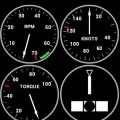
Basic instrument panel for UH-1H that connected via export.lua to DCS World.Initial betaPlease use following telemetryUH1H.lua file for export from DCS:https://docs.google.com/file/d/0B7tSPZhl7CP2ajl3YjZaa2gwV3M/edit?usp=sharingInstructions:1. Create directory C:\Users\[username]\Saved Games\DCS\Scripts\. [username] is your windows user name.2. Copy export.lua from C:\Program Files\Eagle Dynamics\DCS World\Scripts to C:\Users\[username]\Saved Games\DCS\Scripts\3. Copy the above telemetryUH1H.lua file into C:\Users\[username]\Saved Games\DCS\Scripts\ directory.4. Add the folowing line at the end in export.lua to: dofile( "C:\\Users\\[username]\\Saved Games\\DCS\\Scripts\\telemetryUH1H.lua "). Please note using double slashes.Only use use one telemetry file that is for aircraft you are going to fly. Either telemetry.lua for P-51D or telemetryUH1H.lua, not both5. Change [username] to your user name6. Edit telemetryUH1H.lua and change IP to Android table IP. You can check it in the android setting view for WiFi connection. Please try to ping your device from the command line7. Start the application on the devicePlease note that it is very early beta, any feedback is welcome
DCS UH-1H Instruments游戏截图

本周飙升榜



















新游期待榜
热门推荐


相关专题
最新专题


- 友情链接
- 最新游戏


 粤公网安备44010602000283号


玩家评论
更多>>全部评论